
WGF Match Trackers are Hot Fire
Prior to the start of WGF, we were creating files to keep track of standings during World Cup qualifying. Over the years, we’ve continued to develop these to get to the point that there’s really nothing else you could want to know about any tournament or qualifying.
You can get all of our current match trackers available 100% free at our downloads page. And the only thing you have to do is enter scores, and everything else calculates automatically.
Here’s what you get when you download our brand new AFCON 2017 Qualifying match tracker.
Fixtures

You have the ability to update the match dates and match venues as they’re released. The only thing you need to do is type in the score of the match and all standings will populate appropriately. Additionally, once teams have clinched a spot in the finals, they’ll pop up in the “Qualified” section. You can also see the 2nd place standings, where the top two teams will qualify for the finals.
Group Projections

The Group Projections tab is where the magic really starts to happen within this file. Each time the file is opened, the file fetches the current WGF Rankings from our site. You can also hit (CTRL+ALT+F5) or go to Data -> Refresh All to get the most current rankings in the file.
Why would you want that? All projections in the file are based on our rankings, so as they get updated, you’ll automatically get updated projections. This sheet projects the number of points each team will finish the Group Stage with. And even more, as you enter scores in the first tab, these projections update to include played matches and show you our projected final group order.
We also have a “Projected Finalists” section to show you at all times who we expect the final field of 16 to be.
And lastly, in the bottom right of this match tracker, we have a little thing called “Simulations”. You pick the number of simulations you want to run with a max of 2,500 (the more you run, the less prone the projections are to noise). In the background, that number of simulations are run to project the final order of the groups, including matches played to date. So yes, it makes sense to simulate after every match day. We’ll get into that in the next tab.
Running 1,000 simulations should take about a minute, so don’t worry as the wheel/hourglass spins on your computer. It’s working.
Again, check out our Downloads page to get the match trackers.
Simulations

The results of your simulations! This tab simply contains the odds of every team in every group finishing in a specific position. This tab will automatically reorder the teams to put the team we project to top the group at the top.
Final Odds
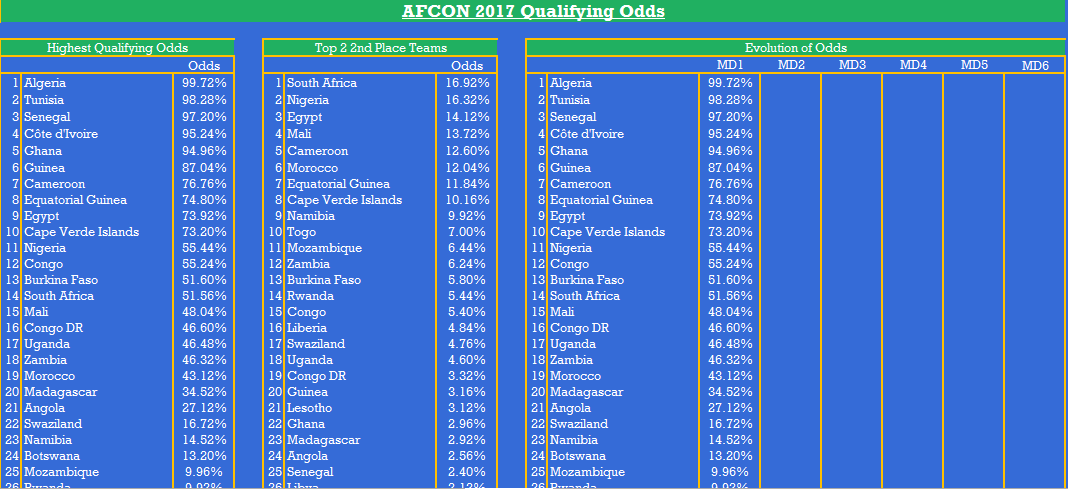
 And lastly, our final projected odds. This tab will update every time you run new simulations, and contains projections for all 51 teams in qualifying.
The first section in the match tracker orders all 51 teams by highest odds of qualifying for the finals. This is the sum of the odds a team tops their group and the odds a team is among the 2 best 2nd place finishers.
The second section is just that: the odds that a team is among the 2 best 2nd place finishers and is part of the simulations. When each simulation is run, it takes the projected points of each second place team and orders them in order to determine the two best.
And the last section, which is brand spankin’ new is called ‘Evolution of Odds’. Every time you run a simulation up until Match Day 1, the first column will populate. Once matches begin in Match Day 1 (you run a simulation after June 12th), the next time you run a simulation, the odds will be populated in the MD2 column. This will continue until MD3 begins. As qualifying goes on, you can see a view of how each team’s odds of qualifying changed.
We hope that you find these useful. We’ve never seen anything even remotely close to this that contains fixtures, standings, odds, projections, simulations all in one place that is completely user-friendly. The user has to do nothing other than enter scores and click the Simulate button. That’s it!
Please be sure to spread the word about our match trackers and follow us on Twitter @We_Global. Thanks for supporting us!